Gaming lag or frozen calls? Test Ethernet before buying a router.
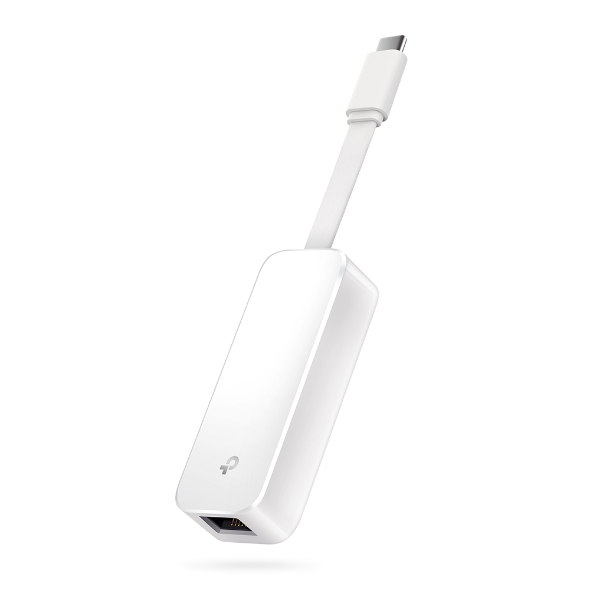
TP-Link UE300C USB-C Ethernet adapter. Official product image: TP-Link. This is the model discussed below.
A new router is a poor purchase if it does not address the fault. Before replacing your network equipment, compare your connection over Wi-Fi and a cable. If your laptop lacks Ethernet, choose an adapter only after checking its ports and operating system.
BudgetComputers Editorial · October 21, 2026 · Research-based guide; not hands-on testing.
Our verdict
For a desk-based laptop with unreliable Wi-Fi, a wired comparison is a useful first step. Borrow a suitable adapter if you can. Use the laptop’s existing Ethernet port or a compatible dock before buying another accessory.
Consider the TP-Link UE300C for USB-C or UE306 for USB-A on a supported system when you need a dedicated wired connection. Skip both if you already have dependable connectivity, cannot run a cable, or need more than Gigabit Ethernet.
Affiliate disclosure: As an Amazon Associate I earn from qualifying purchases. The shopping links below use our affiliate tracking. This is a troubleshooting and buying guide, not a live-deal alert; check the current seller, delivered price and return terms.
Try this before ordering hardware
Note the symptom. Is it a slow download, a call that breaks up, or a game showing unstable ping? Low frame rate and network delay need different investigations.
Compare the same laptop on the same service. Connect a known-working Ethernet cable to a LAN port on your router and the laptop or adapter. Temporarily turn off the laptop’s Wi-Fi so you know which connection is being tested.
Repeat the problem task. Use the same game server or call service where possible. Keep background downloads comparable and repeat at more than one time; one short test does not establish a diagnosis.
Check another device if the problem persists. A problem affecting one laptop calls for different follow-up from one affecting the whole household.
The wireless path, placement or the laptop’s Wi-Fi configuration
A permanent wired connection may solve your desk setup without replacing the router.
Both connections fail on several devices
The router, modem, service provider or service being used
Pause the adapter purchase; it has not isolated a Wi-Fi problem.
Only one laptop struggles
That device’s software, drivers and connection settings
Do not replace a household network solely on this evidence.
The game remains choppy offline
Local game settings and PC performance
A networking accessory is not the first upgrade to investigate.
These are editorial decision rules based on isolating one variable at a time. A wired improvement narrows the possibilities; it does not prove that the router itself is defective.
Look beyond the download-speed number
Bandwidth describes capacity; latency describes delay. Jitter is variation in that delay. A large download result alone does not establish that a connection is consistent enough for a call or an online game.
Intel’s wired-versus-Wi-Fi guidance explains why latency matters for gaming. We have not benchmarked these adapters and do not promise a particular ping reduction or frame-rate increase.
Choose the connector your laptop actually has
Both options below provide a 10/100/1000Mbps Ethernet port through USB 3.0. Neither provides laptop charging, a display output or extra USB ports. You also need an Ethernet cable and an accessible router or network-switch port.
USB-C LAPTOPS
TP-Link UE300C
Good for: a compatible laptop with a spare USB-C data port that needs a straightforward wired connection.
Check first: TP-Link lists Windows 11/10, macOS, Chrome OS and Linux support; consult its support page for your OS and hardware version. A USB-C connector alone does not guarantee compatibility with every device.
Skip it if: your only USB-C port must remain available for charging, your existing dock already has Ethernet, or you need a faster-than-Gigabit connection.
Good for: a supported Windows laptop with a spare rectangular USB-A 3.0 port. TP-Link also documents Linux and Nintendo Switch support.
Check first: the US specification lists Windows 11/10/8.1/8/7 and Linux. Driver requirements vary. The Amazon title also mentions macOS, but the US manufacturer specification does not list it; we would not choose this model for a Mac without exact-version confirmation.
Skip it if: you have only USB-C, require an unconfirmed operating system, or already have a working Ethernet port.
Specification sources: UE300C and UE306. Check the linked support pages before ordering. Neither recommendation is a claim that it is the cheapest adapter available.
If you also need monitor output, charging and other ports, compare the complete cost with a suitable hub. Our Anker 332 versus 555 guide explains which model includes Ethernet and the other compatibility checks.
What an adapter will not fix
Your broadband plan: a Gigabit adapter does not upgrade the service you pay for.
Every network bottleneck: cable, router ports, host USB connection and internet conditions still matter. The advertised link rate is not guaranteed download throughput.
A distant or overloaded service: changing your local connection cannot remove every delay elsewhere on the internet.
The whole home: one wired laptop does not repair wireless coverage for other rooms.
If a stable connection leaves your video calls looking dark or sounding unclear, tackle that separately with our webcam, lighting and audio guide.
Before you keep it
Confirm the exact adapter and connector, install only the appropriate manufacturer-provided driver if required, and test your normal workload during the retailer’s return window. Keep the purchase only if it solves your problem or provides a wired connection you will actually use.
Our research and limits
We compared TP-Link’s US documentation with the exact Amazon model listings and consulted Microsoft, Intel and Cloudflare for troubleshooting and measurement guidance. The operating-system discrepancy above is retained because it can change a purchase decision. We have not tested these adapters, verified a current discount or ranked every competing model.